|
-
Normal temp range for QX6850?
In running a QX6850, with a big heatsink (see sig).
I have it overclocked to 3.66 (no FSB change, just upped the multiplier from 9 to 11) w/ Vcore voltage @1.45.
Anyway, I've been running it like this for a long time, and just recently I got Everest and started checking the temps.
Idle, the "CPU" temp is about 53, and the other CPU temps show:
CPU1 / Core 1 62
CPU1 / Core 2 62
CPU1 / Core 3 55
CPU1 / Core 4 55
Is this too high? Do I need to reseat and re-grease the heatsink?
Thanks
Acer TravelMate 8100. Vista Ultimate 32.
Alienware m5550. Vista Ultimate 64.
Asus Rampage Formula X48, Intel QX9770 o'c to 4.0ghz, Thermalright Ultra 120 Extreme, Cooler Master Stacker 830 case, 8 GB Geil EVO One DDR2 PC2-8500 @800, EVGA 9800 GX2 Factory Over Clocked (KO model), X-Fi Platinum, X3 800 watt PSU, 20" Samsung 2493 24" 1920x 1200, 2 x Segate 500GB Baracuda ES in Raid 0, 2 x Samsung 1TB Spinpont F1, Vista Ultimate 64 bit.
-
as i was saying, the power dissipation can be generalized by P = CV^2F
where P is power, C is capacitance, V is voltage and F is the frequency.
taking examples from measurements of other kentsfields online, i've found an average C to be 0.02382 from this and your quoted voltage and freq i have approximated your power dissipation at 183.5989623 watts. compare this to a stock Q6600 at 102w full load.
with an ultra 120 extreme and lots of airflow, you should be expecting to idle in the mid to low 40s and load in the 50s, so i would get a good fan and reapply the correct amount of grease. i recommend arctic silver 5. you could certainly drop 15C with an optimized setup. if you haven't already, i would try flirting with lower voltages, and testing for stability issues. if you could run on 1.4 you'd have shaved off 12 watts. if you can run 1.35 you'd have saved 25w. it's worth looking into. even then, in a rather lucky low voltage environment, you'd be at roughly 160w under full load, which is a ton. more than a Presler at 3466Mhz. so you also need to consider some adjustments to your airflow situation.
I would consider buying a pair of either Panaflo FBA12G12L1BX (30dbA) or pair of Scythe SFF21E (20dbA). The panaflos will move 40% more air for 50% more noise. both fans are $15 apiece. you have an awesome case, and i would consider the scythe fans for the most of the 120mm mounts in your case. and perhaps one for the side door.
if your configuration were worst-case, you could certainly be subject to idling in the high 50's and loading in the low 80's. kentsfields at stock speeds do this 24/7 with the retail cooler.
Last edited by iamsostupid; 02-24-2008 at 05:00 AM.
-
Thanks for the voltage suggestion, never even mentally associated vCore setting with CPU temps.
Problem with the heatsink:
The big Thermalright slides around a lot. As you know, the mobo sits vertically, and so I have this big, tall, heavy heatsink secured to the CPU by just those 4 spring loaded screws. I can grab the heatsink with my hand, and literally slide it around a few mm in any direction. Not sure if this is normal for the Thermalright Ultra 120. (any owners care to comment?)
Fans:
I run 5 fans: 4 Scythe SFF21E's and 1 unknown (came with the Case). These are the Scythes I run:
http://www.scythe-usa.com/product/ac...ex_detail.html
(again, the SFF21E model)
One strapped to the Thermalright 120, one as an exhaust on the rear of the case, and two as intake on the side panel. The Coolermaster came with some type of intake fan in the front, that blows across the HD's. It has a blue LED and is fairly low output but quiet.
Noise is a major priority for me, and the Scythes are very quiet. The loudest component of my system by far is the exhaust fan in the PSU. If I were a bit braver, I'd open up my PSU, rip out the stock fan, and replace it with another Scythe SFF21E. So in other words, I'm not willing to go with higher output fans (unless one exists with the same DB as the 21E). In fact, I'm half considering replacing all the 21Es with SFF21D's, to make things even quieter.
Sorry to ramble, but again, thanks for the voltage advice. That definitely shaved off a few degrees. Now to run some benchmarks and see if its stable...
Benchmark Tests:
The system would not make it through PCMark 05 and/or 3DMark 06 with anything less than a vCore of 1.425. I tried 1.372: BSOD. 1.38125: BSOD. 1.40: BSOD. 1.425: Both Tests Ok.
I watched the Everest task bar temp meter, and the "CPU" (first number above) for to 71 degress C at the end of the test, when the program runs multiple tests at once.
Ran through a bit of the Crysis 64 bit benchmark too. Had Everest keep a log, and the log showed at one point core 1 was 73 and core 2 was 70 (core 3 and 4 were both 62, Crysis doesn't use them)
System idles at, 3.66 ghz @ 1.425v
The "CPU" temp is about 48 and the other CPU temps show:
CPU1 / Core 1 59
CPU1 / Core 2 59
CPU1 / Core 3 52
CPU1 / Core 4 52
(still slightly lower than my first post @ 1.45 volts, so again, thanks for the tip)
Last edited by skypine27; 02-24-2008 at 08:29 AM.
Acer TravelMate 8100. Vista Ultimate 32.
Alienware m5550. Vista Ultimate 64.
Asus Rampage Formula X48, Intel QX9770 o'c to 4.0ghz, Thermalright Ultra 120 Extreme, Cooler Master Stacker 830 case, 8 GB Geil EVO One DDR2 PC2-8500 @800, EVGA 9800 GX2 Factory Over Clocked (KO model), X-Fi Platinum, X3 800 watt PSU, 20" Samsung 2493 24" 1920x 1200, 2 x Segate 500GB Baracuda ES in Raid 0, 2 x Samsung 1TB Spinpont F1, Vista Ultimate 64 bit.
-
...

my qx6700 idles at 49 48 50 50 right now at 3,3 Ghz, so i guess yours are not that outrages.
edit: i undervolted my qx6700 too, stock vcore was 1,35v i lowered it to 1,3v and system is still stable at 3,3Ghz. You should find your lowest vcore possible at 3,6Ghz.
Last edited by Reign; 02-24-2008 at 12:06 PM.
----------
Intel QX6700 Tuniq Tower (3,30Ghz) |Intel D975XBX2 |4x 1GB OCZ Platinum XTC DDR2-6400
Gigabyte 8800Ultra OC'd to (650/2200/1605)| X-fi XtremeGamer Fatal1ty Pro | Dell 2005 FPW
Lian-Li v1000 plus| Silverstone ST56ZF 560W |WD Raptor 150GB |2x Seagate 7200.10 320GB
----------
-
well, i would try reapplying AS5, and while the heatsink is off, put washers between the mounting bracket and the springs and see if that won't tighten things up for you.
you may also want to try 2 fans on the heatsink.
Last edited by iamsostupid; 02-24-2008 at 03:14 PM.
-
I considered 2 fans on the heatsink, one on each side of the heatsink.
Right now, on the "right side", as in intake (blowing from the right to the left) I have a Scythe 21E (1200RPM. 50CFM @ 20db)
Pic:
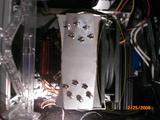
Today, I ordered what I hope is a hot rod, and quiet, fan to replace the 21E on the CPU heatsink. It's the:
http://www.frozencpu.com/products/52...?tl=g36c15s562
It's supposed to put out 60 CFM @ 14db! There has been some talk of these guys fudging their db numbers, but I'll test it and see. I'm hoping, if the numbers are true, that it might lower the CPU temp 1 or 2 degrees.
Then, if noise is acceptable, I will put the old 21E on the backside of the heatsink and see what it does. Noise is a premium concern for my PC these days. I'm on a kick to build a nearly silent, but still hot rod, computer.
Anyway, system seems to be running fine with an Nvolt setting of 1.5 and vCore setting of 1.425. I can't remember if there is a Vcore BIOS setting between 1.40 (where I got BSODs during 3Dmark06) and 1.425 (where everything finally worked fine).
Might check later out of boredom....
Acer TravelMate 8100. Vista Ultimate 32.
Alienware m5550. Vista Ultimate 64.
Asus Rampage Formula X48, Intel QX9770 o'c to 4.0ghz, Thermalright Ultra 120 Extreme, Cooler Master Stacker 830 case, 8 GB Geil EVO One DDR2 PC2-8500 @800, EVGA 9800 GX2 Factory Over Clocked (KO model), X-Fi Platinum, X3 800 watt PSU, 20" Samsung 2493 24" 1920x 1200, 2 x Segate 500GB Baracuda ES in Raid 0, 2 x Samsung 1TB Spinpont F1, Vista Ultimate 64 bit.
 Posting Permissions
- You may not post new threads
- You may not post replies
- You may not post attachments
- You may not edit your posts
-
Forum Rules
|
|


 Reply With Quote


