|
-
Handbrake setting question.
I have been transcoding and have noted an issue with B/W DVD's. During play back I get a lot of banding around the edges of things during movement. I transcode the a number of advanced settings. If that information would help I can post it. It does not seem to be nearly as much an issue with Color DVD's.
-
LOLWUT

Can you post a screenshot? What kind of "banding"? You mean interlacing lines?
-
 Originally Posted by drdoom

I have been transcoding and have noted an issue with B/W DVD's. During play back I get a lot of banding around the edges of things during movement. I transcode the a number of advanced settings. If that information would help I can post it. It does not seem to be nearly as much an issue with Color DVD's.
Originally Posted by ImaNihilist
Can you post a screenshot? What kind of "banding"? You mean interlacing lines?
Indeed. It sounds like interlacing artifacts during movement. (I.e. in one frame a person/object is at position x, next frame they've moved to position y. The deinterlacing is incorrectly combining these two frames.)
Crusader for the 64-bit Era.
New Rule: 2GB per core, minimum.
Intel i7-9700K | Asrock Z390 Phantom Gaming ITX | Samsung 970 Evo 2TB SSD
64GB DDR4-2666 Samsung | EVGA RTX 2070 Black edition
Fractal Arc Midi |Seasonic X650 PSU | Klipsch ProMedia 5.1 Ultra | Windows 10 Pro x64
-
What settings will fix the problem?
-
LOLWUT
Originally Posted by drdoom
What settings will fix the problem?
None. It can't be fixed.
There are different deinterlacing filters and settings you can use, but the core problem is you don't have any full frames. The problem is worse during motion, right? Fast motion looks terrible.
See the wiki here: http://en.wikipedia.org/wiki/Deinterlacing and here: http://en.wikipedia.org/wiki/Telecine
Interlacing artifacts are the worst when looking at 24p that has been telecined to 30 frames so it can be displayed on a 60Hz CRT.
In the United States and other countries where television uses the 59.94 Hz vertical scanning frequency, video is broadcast at 29.97 frame/s. For the film's motion to be accurately rendered on the video signal, a telecine must use a technique called the 2:3 pulldown, also known as 3:2 pulldown, to convert from 24 to 29.97 frame/s.
Basically, the ORIGINAL source was shot at roughly 24 frames. But back in the day you could broadcast 24p, only theater was 24p capable. So the content was "converted" to roughly 30 frames so that half of each frame could be displayed on a 60Hz TV. To do this they basically added a 5th frame to every 4 frames.
This is what the problem looks like visually:
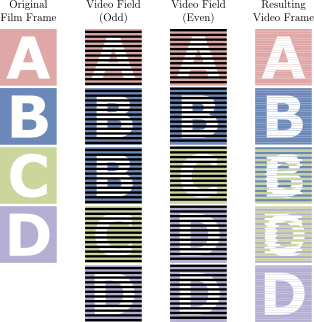
This would look fine on a 60Hz CRT, but because of the way LCDs work by refreshing the entire screen instead of every other line the artifacts are more apparent. VLC has some interesting de-interlacing options IIRC. I had this problem with the Venture Bros Season 1 and 2 DVDs. Never did find a good solutions. It is, apparently, possible to reverse 3:2 pulldown…but not with Handbrake.
Last edited by ImaNihilist; 07-27-2012 at 01:34 AM.
-
Thanks. I'll play with the VLC setting to see if I can lessen the problem.
-
LOLWUT
You might be able to find some more help on the HandBrake board. You might even find an old thread there with me talking about this very issue. People there might be able to help you find the "best" settings, but I could barely ever tell the difference. It always looked like crap to me and I just gave up and used VLC to view the videos.
Last edited by ImaNihilist; 07-27-2012 at 03:20 PM.
-
Is the issue exclusive to LCD monitors? I notice the banding when I am watching on my laptop. I didn't seem to see it when I was watching on my plasma.
Or was I just not noticing it for some other reason?
-
LOLWUT
Originally Posted by drdoom
Is the issue exclusive to LCD monitors? I notice the banding when I am watching on my laptop. I didn't seem to see it when I was watching on my plasma.
Or was I just not noticing it for some other reason?
Correct. The issue only exists on LCDs or displays which are solely progressive. A 60Hz plasma can display the interlaced format properly, by updating every other line every 1/60th of a second.
-
I played with the deinterlacing filters in VLC and they seem to do a pretty good job of fixing the problem.
-
LOLWUT
I started looking into this again after this thread, as I haven't actually looked at this in a few years, and I have a pretty big correction to make. Apparently HandBrake actually IS capable of detelecine now. Not sure when this was added (definitely wasn't available when I was transcoding my DVDs), but it seems pretty cool: https://trac.handbrake.fr/wiki/Telecine. Scroll down to "Inversing the Telecine Process". Apparently they have a new function called pullup which can reverse 3:2 pulldown.
Give the "same as source" detelecine a try and see what happens. I don't have a DVD drive anymore, so I can't test, but give it a try and let me know if it works well for you!
-
I'll give that try. Of course, I've finished transcoding all the B/W DVD's that were giving me problems. Maybe I'll redo them if it looks significantly better.
 Posting Permissions
- You may not post new threads
- You may not post replies
- You may not post attachments
- You may not edit your posts
-
Forum Rules
|
|


 Reply With Quote

