|
-
 WIN98SE Puzzle Solved!: Windows Protection Error, Corrupt setupx.dll? WIN98SE Puzzle Solved!: Windows Protection Error, Corrupt setupx.dll?
***2/3/06 update*** Problem solved by re-installing Windows 98SE
Thanks everyone for all the help, especially I4one!
Bob
******************************************************
Arg! I'm having trouble booting my Windows 98SE based PC.
When I try to boot I get a black screen with the following message:
Windows protection error. You need to restart your computer
There haven't been any hardware or software changes to my system that I'm aware of that might have caused this problem.
Multiple restarts produce the same error.
I can start in Safe Mode.
I ran Norton Anitivirus and nothing was detected.
I ran Norton Disk Doctor and nothing changed
I ran Scandisk and nothing changed.
I ran msconfig and tried different "Selective Startup" combinations but that didn't help.
I ran the System File Checker and I got this message:
System file checker has identified that the following file may be corrupted:
C:\WINDOWS\SYSTEM\setupx.dll
When I pick the Restore option I found an apparent duplicate file in the following location:
C:\WINDOWS\Helpdesk\SFC\setupx.dll
But when I try to restore the file I get the following SFC error after a minute or so: This program has performed an illegal operation and will be shut down
I ran into the same problem on multiple attempts to restore the file.
Then I downloaded a copy of setupx.dll on another computer onto a floppy disk and tried to restore from that location. But my floppy drive doesn't work in Safe Mode. And my CD Drive also doesn't work in Safe Mode so I've been unable to retrieve the file from my original Windows 98 CD.
I'm not really sure what to try next.
Any suggestions?
Thanks!
Bob
Last edited by BobF; 02-03-2006 at 07:24 PM.
-
well - you have a couple of options;
*1* Try using the SCANREG /Restore command
*2* Extract a new version from a Command Prompt boot
*3* use bruteforce and Delete everything assoc w/SFC backups
*4* reinstall 98 on top of itself
** 1 ** - Boot to "Command Prompt Only" , instead of Safe Mode
- type in Scanreg /restore - choose a date, that you know precedes the issue.
** 2 ** - Boot to "Command Prompt Only"
- type in
Extract /a /y E:\Win98\Base4.cab Setupx.dll /L C:\WINDOWS\SYSTEM
where "E" is the CDRROM drive letter
[Note] if you have trouble accessing the CD in DOS mode - post your CONFIG.SYS and AUTOEXEC.BAT files and I'll fix them so you can load -- usually you'll just need entries like;
CONFIG.SYS
Code:
DEVICE=C:\WINDOWS\COMMAND\OAKCDROM.SYS /D:CD001
AUTOEXEC.BAT
Code:
LH C:\WINDOWS\COMMAND\MSCDEX.EXE /D:CD001
note also - that is certainly possible to obtain CDROM support while in safe mode - it's just some jumping through hoops by adding a few lines to config.sys and dosstart.bat files
** 3 ** - Boot to "Command Prompt Only"
- type in DELTREE C:\WINDOWS\HELPDESK\SFC <enter>
- type in DEL C:\WINDOWS\Default.sfc
** 4 ** well - you likely already know how to reinstall -- you have Backups ....correct ?
Last edited by I4one; 01-19-2006 at 08:02 AM.
Delete the Electoral College - Support
www.NationalPopularVote.com
"The world according to DRM Bozos"
I am a consumer, I'll buy anything
I am a sheep, I am cattle, I follow the herd
I am ignorant, a dumbass, and I am a bozo...
I am the epitome of the 'rank and file'
I am your next door neighbor
I am 95% of American Consumers
I will consume you
- If the light in your head hasn't come on yet,
I suggest you go get a new bulb!
-
Thanks for the help!
I'll give your suggestions a try tonight.
Bob
On the advice of council, I won't comment on my backup situation. ;-)
-
Regarding Option 4: Reinstall 98 on top of itself
Actually, it's not immediately clear to me how I would go about this. Can you provide further details or point me somewhere else? I have a boot floppy, if that would help.
And, if I reinstall Windows, are my non-Windows files lost?
Bob
-
Hammerhead Shark

This might help. Good Luck.
Last edited by Cloned; 01-19-2006 at 05:39 PM.
-
Thanks!
I've got a copy of Windows XP sitting on the shelf. Maybe I'll install that once I get this trouble resolved.
Bob
 Originally Posted by Cloned
This might help. Good Luck.
-
Couple of Notes;
"OEM" 98 are the only Bootable 98 CDs...(Full Retail, and Upgrade versions are _not_)
-- workaround;
Boot to floppy and select "Start w/CDROM support"
*** Make sure you have your "ProductID" and "ProductKey" (C.O.A.) handy before the reinstallation ***
Start | run REGEDIT;
go to;
HKEY_LOCAL_MACHINE\Software\Microsoft\Windows\CurrentVersion
and grab (write down) those entry values i listed above
or use "Belarc Advisor" (or similar) to obtain all your installed software keys - or scan the reg.
Also - d/l any/all Drivers before re-installation
Find and Rename win.com to .old (usually found in C:\WINDOWS) from either a command prompt only (DOS) or Safe Mode boot...
Proceed to reinstall ...Backup you data and then do a "Clean Install" 
plz do NOT go the XPoop route
Delete the Electoral College - Support
www.NationalPopularVote.com
"The world according to DRM Bozos"
I am a consumer, I'll buy anything
I am a sheep, I am cattle, I follow the herd
I am ignorant, a dumbass, and I am a bozo...
I am the epitome of the 'rank and file'
I am your next door neighbor
I am 95% of American Consumers
I will consume you
- If the light in your head hasn't come on yet,
I suggest you go get a new bulb!
-
Thank you for the additional help. I was pretty burned out working on this late last night!
Bob
Originally Posted by I4one
Couple of Notes;
"OEM" 98 are the only Bootable 98 CDs...(Full Retail, and Upgrade versions are _not_)
-- workaround;
Boot to floppy and select "Start w/CDROM support"
*** Make sure you have your "ProductID" and "ProductKey" (C.O.A.) handy before the reinstallation ***
Start | run REGEDIT;
go to;
HKEY_LOCAL_MACHINE\Software\Microsoft\Windows\CurrentVersion
and grab (write down) those entry values i listed above
or use "Belarc Advisor" (or similar) to obtain all your installed software keys - or scan the reg.
Also - d/l any/all Drivers before re-installation
Find and Rename win.com to .old (usually found in C:\WINDOWS) from either a command prompt only (DOS) or Safe Mode boot...
Proceed to reinstall ...Backup you data and then do a "Clean Install"
plz do NOT go the XPoop route
-
OK,
I tried the SCANREG/restore command and it failed with the several older dated files that I found.
I booted using a Windows 98 boot floppy and tried to extract the setupx.dll file from the Windows 98 CD in the CD drive. The CD drive spun up and I saw a list of files ending in "Cabinet WIN_9869.CAB" and then the message "No matching files". Perhaps I miss-typed the extract command?
I tried the brute force method and deleted helpdesk and default.sfc files and that did not fix things.
Any thoughts for what to try next?
Bob
-
aha! it's in Precopy2.cab
I could've swore i "viewed" (looked into), with Cabview.dll, those pesky 'mini.cab' and 'precopy1/2' CABs before i even tried my 'extraction'.
I have Setupx.dll in my \System folder as well (718KB)...and I too had trouble extracting while using the previous command -- "No Matching Files" is what i got too, but i thought perhaps it was diff in Win98SE, since i only have 98FE here. The Base4.cab technique will search "almost" every CAB in \Win98 - except for the ones that start with Mini, Precopy, Driver, and Net
In hindsite - i should've known better, but haven't had to use 'Extract' in a long time - and since SETUPX.DLL is directly related to RunDLL and INF files (Installation/Info files) - the Precopy2 contains almost all the INFs. BTW - Precopy1 and 2 contents are what get copied to the HDD during installation...there are also 'certain' files (such as WIN.COM) which NEED to be Extracted using "WIN.CNF" (<-- that's it's name in the CAB file it resides in)..it then needs to be REnamed to WIN.COM - but that's another story. I had tried that by extracting many "SETUP" files (using Setup*.*) and tried to find one of the correct size.
so... here's the extract command;
Extract /a /y E:\Win98\Precopy1.cab SETUPX.DLL /L C:\WINDOWS\SYSTEM
 Hopefully she'll boot now Hopefully she'll boot now
BTW - here's a list of "supposedly" all the files that can NOT be extracted (or don't 'reside') in the CAB files;
http://www.geocities.com/~budallen/9...File%20Checker
Code:
Control.ini              Exchange32.ini     Msbatch.inf
Msmail.ini               Msoffice.ini       Ndislog.txt
Powerpnt.ini             Progman.ini        Protocol.ini
Qtw.ini                  Ripaux.dll         Setup.old
Site.ini                 Telephon.ini       Wavemix.ini
Wininit.ini              Index.dat          Mstask.cnt
Mstask.hlp               Drvidx.bin         Mstask.inf
Setup.inf                Classes.zip        Tclasses.zip
Computerinfo.ocx         Crypt32.dll        Icwscrpt.exe
Ie32dsw.ocx              Ie32dsw.txt        Intro.dcr
Javaee.dll               Javasntx.dll       Jsproxy.dll
M5drvr32.exe             M5drvr32.rst       M5if32.dll
Mstask.dll               Mstask.exe         Mstinit.exe
Rnaph.dll                Selectfiledlg.ocx  Swadcmpr.x32
Swastrm.x32              Sysagent.exe       Vmm32.vxd
Vsrevoke.dll             Winoa386.mod       Wintrust.hlp
Xobglu16.dll             Xobglu32.dll
though - there are CAB files thast reside WITHIN other CAB files, such as the DirectX and Java Class files --> Win32ie4.cab, xmldso4.cab, iejava.cab, dajava.cab -- these end up in %Windir%\Downloaded Programs Files in a default Win98/IE4 install.
further still complicating things is the VMM32.VXD beast ((CONFIGMG.vxd), (NTKERN.vxd))-- which is built (from about 40-50 VxD files) during Setup...just look here;
HKEY_LOCAL_MACHINE\System\CurrentControlSet\Control\VMM32Fil es
Last edited by I4one; 01-20-2006 at 03:08 AM.
Delete the Electoral College - Support
www.NationalPopularVote.com
"The world according to DRM Bozos"
I am a consumer, I'll buy anything
I am a sheep, I am cattle, I follow the herd
I am ignorant, a dumbass, and I am a bozo...
I am the epitome of the 'rank and file'
I am your next door neighbor
I am 95% of American Consumers
I will consume you
- If the light in your head hasn't come on yet,
I suggest you go get a new bulb!
-
Wow! Thanks for the super fast reply.
I tried that new extract command and it seemed to work great. I got an "extracting file" message while the CD drive was spinning. It then went back to the A: command prompt. I did this running off the boot floppy. And when I checked the properties of the C:\WINDOWS\SYSTEM\Setupx.dll it lists the following:
Modified: Monday, May 11, 1998
Accessed: Thursday, January 19, 2006
So it looks like it's a new file.
But when I restart in the Normal mode I get the same "Windows protection error. You need to restart your computer."
I'm still able to boot into the Safe Mode.
I tried the System File Checker utility but that won't run because I deleted the default.sfc file earlier.
Could it be that there's some other problem aside from the setupx.dll file?
I'll check back here in the morning.
Thanks again for all of the help!
Bob
Originally Posted by I4one
I could've swore i "viewed" (looked into), with Cabview.dll, those pesky 'mini.cab' and 'precopy1/2' CABs before i even tried my 'extraction'.
I have Setupx.dll in my \System folder as well (718KB)...and I too had trouble extracting while using the previous command -- "No Matching Files" is what i got too, but i thought perhaps it was diff in Win98SE, since i only have 98FE here. The Base4.cab technique will search "almost" every CAB in \Win98 - except for the ones that start with Mini, Precopy, Driver, and Net
so... here's the extract command;
Extract /a /y E:\Win98\Precopy1.cab SETUPX.DLL /L C:\WINDOWS\SYSTEM
Hopefully she'll boot now
-
the hunt continues
1st -- welcome
i just happened to be around at this time tonight -- sometimes, i don't check in for 24-48hrs or more, depending on what else i got going on.
Let's try some 'typical' known other software remedies;
Boot into "Command Prompt Only"
at C:\>
type in DEL C:\WINDOWS\WININIT.* <enter>
type in Extract /a /y E:\Win98\Base4.cab Wininit.* /L C:\WINDOWS
<enter>
ctrl+alt+del to Reboot
Boot into "Command Prompt Only" again
type in SCANDISK /all (<--notice the one Blank Space)
whatcha got ?
-- I'm also thinking a hardware error
Shutdown unplug COMPLETELY from wall outlet and
* Clear out the dust bunnies
* Reseat the RAM
* Check ALL the cables and their connections
* look at the Mobo capacitors, for Top-rounded, Leaky, Bulging - see THIS
Can you think of ANYTHING you were doing that may have caused this ? ..perhaps unplugging USB device ? ..or though unlikely, malware ?
getting Any other specific ERROR messages now ?
[EDIT]
3 other things;
1. Do you have both HDDs on the Same IDE Channel ?
Both Optical drives on the other ?
any ZIP drives ?
2. Boot into Safe Mode and look in Device Mangler for any '!' or '?' (red or yellow) next to any devices
3. Are you SURE you didn't mess up (leave previously changed settings) while in MSCONFIG -- IOW, it's back to "NORMAL" Startup ?
Last edited by I4one; 01-20-2006 at 03:58 AM.
Delete the Electoral College - Support
www.NationalPopularVote.com
"The world according to DRM Bozos"
I am a consumer, I'll buy anything
I am a sheep, I am cattle, I follow the herd
I am ignorant, a dumbass, and I am a bozo...
I am the epitome of the 'rank and file'
I am your next door neighbor
I am 95% of American Consumers
I will consume you
- If the light in your head hasn't come on yet,
I suggest you go get a new bulb!
-
Thanks again.
I just extracted the Default.sfc file from my Windows CD using the more recent extract command that worked for setupx.dll. But when I tried to run the System File Checker utility it runs for a bit and then locks up with the following message
"This program has performed an illegal operation and will be shut down.
(I was hoping to see if the SFC still identified the setupx.dll file as being corrupted.)
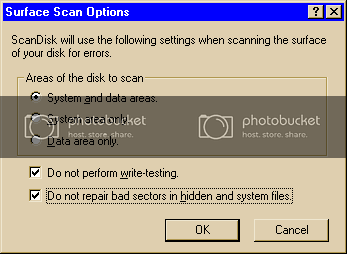
I entered the new command lines you listed and I have ScanDisk running now.. but I must sleep. Should I also run the "Surface Scan" option in ScanDisk?
I'll take a closer look at it tomorrow night and I'll check for hardware problems. I'll also try to think about any possible changes that might be related to this problem. Malware is a possibilty although I do run Norton AntiVirus with up to date virus definitions.
Bob
Last edited by BobF; 01-20-2006 at 04:24 AM.
-
here's more for "to do" list
heh ... you should really forget about SFC as a Backup -- i guess it could be OK (especially when another Apps, you install overwrites DLLs). I've only ever used SFC as an extraction tool (1 file at a time in Win GUI) -- But note;
System File Checker Tool Extracts Incorrect File Versions (this was 'supposedly' fixed in 98SE - and our Extraction of SETUPX.DLL should NOT be an issue as there is no other SetupX.DLL anywhere in my CABs)...stupid MS articles. You posted the Date/TIme of SetupX, but not the File SIZE ..Check, and if it's 718KB (or 719KB), you're fine! as far as that file goes -- did you Extract other files ? (besides what I had said to)
I have seen NAV make mush out of a system, all on it's own - and NAV can even hijack SCANDISK.EXE and SCANDISK.INI (look in C:\WINDOWS\COMMAND for SCANDISK.old or similar) -- the 32bit version that you run in Windows' GUI is SCANDSKW.EXE and is located in \WINDOWS
Being able to boot into Safe Mode leads me to think that it's a 32bit Protected Mode Driver somewhere screwing it up -- perhaps this;
http://support.microsoft.com/kb/q151911/
1. For safe keeping -- "Write-Protect" your Win98 Bootup floppy (use the physical lever in the corner to LOCK it)
2. Go to https://europe.f-secure.com/download...se/tools.shtml
and d/l the F-Secure Anti-Virus for DOS
create a Boot floppy and Run it on the system
-- You can try their Full version as a "Free 30day evaluation" if you like;
https://europe.f-secure.com/download...ti-virus.shtml
3. ?? Using a NIC or Dialup ??
If a NIC, you may be able to Boot to "Safe Mode with Networking" and go to http://housecall.trendmicro.com (it'a an ActiveX online scanner) - d/l and scan
4. Boot to a "Command Prompt Only" and;
type in DELTREE C:\WINDOWS\TEMPOR~1\CONTENT.IE5 <enter>
type in DELTREE C:\WINDOWS\TEMP\*.* <enter>
type in DEL C:\WINDOWS\TEMP\*.* <enter>
type in DELTREE C\WINDOWS\LOCALS~1\APPLIC~1\*.* <enter>
-- ?? Are you using User Profiles ?? ...with a password at Bootup ? (C:\WINDOWS\Profiles\<usernames>)
-- ?? What version of IE is installed ??
I'd love to see your SYSTEM.INI and WIN.INI contents
--> Do a Safe Mode Boot -- Start | Run SYSEDIT
Copy and Paste each files contents here
Check your C:\WINDOWS\Downloaded Program Files folder for Unwanted ActiveX controls and Delete them
Start | Run MSCONFIG and choose "Startup" Tab - Disable (untick) ALL except "System Tray" and "Scan Registry"
-- you will end up re-enabling whatever you unticked
Sleep well - i'm pooped now too
but this should keep you busy for a little while - hoopefully with good results, somewhere
[EDII] ..oh - as afar as a surface scan, I'd use the HDD Manu utlities instead, but it "depends" on what the "Advanced/Custom" parameters are set to in SCANDISK.INI -- you 'may' really F yourself, if you let it repair MS-DOS mode name length errors - or let it relocate Blocks of Data. If you run Surface scan - do it in Safe Mode with these settings;
Here's just one other "gotcha" to be aware of;
http://support.microsoft.com/kb/243450/EN-US/
Last edited by I4one; 01-20-2006 at 05:21 AM.
Delete the Electoral College - Support
www.NationalPopularVote.com
"The world according to DRM Bozos"
I am a consumer, I'll buy anything
I am a sheep, I am cattle, I follow the herd
I am ignorant, a dumbass, and I am a bozo...
I am the epitome of the 'rank and file'
I am your next door neighbor
I am 95% of American Consumers
I will consume you
- If the light in your head hasn't come on yet,
I suggest you go get a new bulb!
-
Thanks for the additional "to do" items. I really appreciate all the help.
I'll work on it again tonight.
I wonder if it would help to disconnect all the unnecessary hardware and try to boot with a minimal system. I did build this PC so I'm fairly comfortable with taking it apart.
Bob
 Posting Permissions
- You may not post new threads
- You may not post replies
- You may not post attachments
- You may not edit your posts
-
Forum Rules
|
|


 Reply With Quote

