|
-
Tiger Shark

Upgrade Laptop Wifi Card 802.11N
Hello,
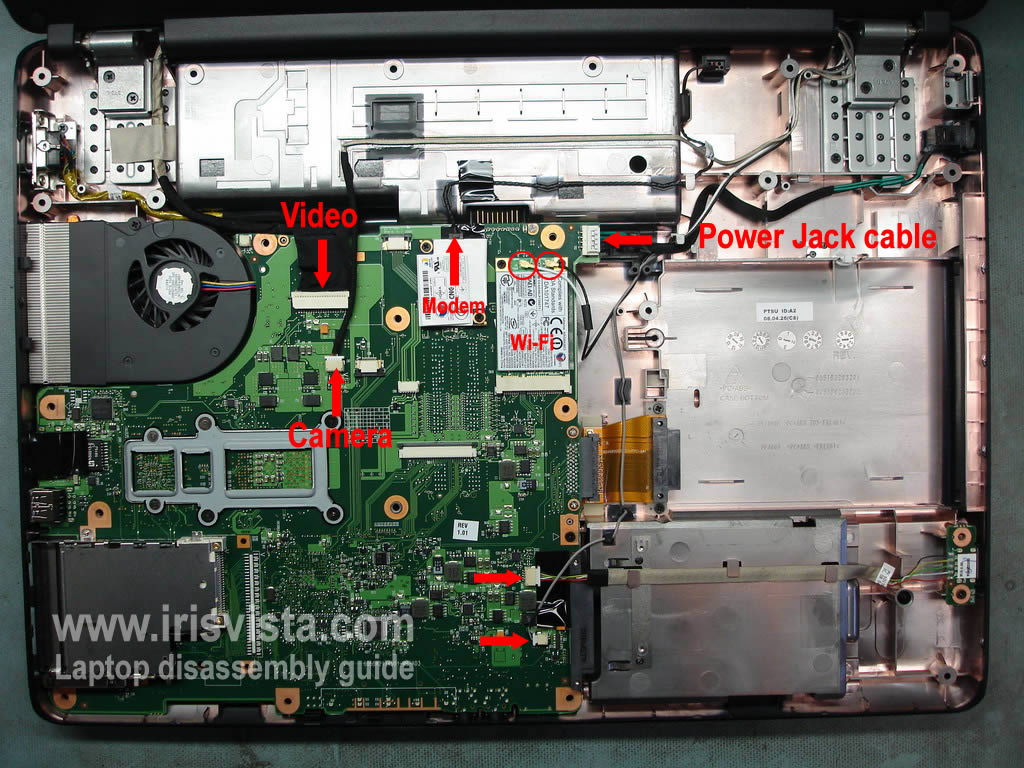
I have a Toshiba L305D laptop that I would like to upgrade the WiFi Card to 802.11N dual band. I can't seem to find anywhere a card that is 802.11N that operates in both 2.4 GHz and 5 GHz bands that seems to look anything like what I have in my laptop. Below is a picture of what my WiFi card looks like in my laptop. What kind of card is it anyways, mini pci, mini pci express? If anyone could find a card online for sale that would plug into my current laptop that would be great. Notice that I only have 2 leads for the antennas, I noticed that some Wifi cards had 3 leads.
I've tried looking for external PC Card adapters but none of them are 5Ghz compatible. I have a Belkin F7D4101 USB adapter now but I get horrible throughput with this adapter that is even slower then 802.11G speeds. Ideally I would like to just replace the internal WiFi adapter so I don't have crap sticking out the side of the laptop I can break off. 
-
Tiger Shark
went on Ebay and bought this card for $5... I hope it works.
http://www.ebay.com/itm/330669936075...#ht_500wt_1048
-
Good luck finding compatible drivers. In my experience HP drivers do not always work on non-HP gear. OTOH $5 isn't much of a risk.
-
Tiger Shark
 Originally Posted by ua549

Good luck finding compatible drivers. In my experience HP drivers do not always work on non-HP gear. OTOH $5 isn't much of a risk.
The 482260-001 part number is an HP part number.... But this card under its Atheros AR5BXB92 part number is actually used in a lot of laptops including Toshiba. I'm pretty confident that windows 7 will have a driver for it. Only thing I am worried about is if it is Dual Band and able to pick up 5 GHz signals which, after some research, apparently does have this capability. Like you said, if it doesn't work for $5 I'm not going to loose any sleep.
Last edited by PilatusInc; 01-23-2012 at 07:25 AM.
Reason: typo
-
IIRC you need 3 antenna leads. I upgraded my Dell D620 with an Intel card quite awhile ago. Dell planned ahead and had the extra antenna built into the lid. I'm not sure if it will work at full speed with only 2 antennas. Good luck.
-
Tiger Shark
Originally Posted by ua549
IIRC you need 3 antenna leads. I upgraded my Dell D620 with an Intel card quite awhile ago. Dell planned ahead and had the extra antenna built into the lid. I'm not sure if it will work at full speed with only 2 antennas. Good luck.
This WLAN card has only 2 antenna leads so I don't have to worry about that.
-
Intel 6200 ~$40 and an awesome dual-band card. Only reason I didn't recommend the 6300 is that you only have 2 antenna leads.
Crusader for the 64-bit Era.
New Rule: 2GB per core, minimum.
Intel i7-9700K | Asrock Z390 Phantom Gaming ITX | Samsung 970 Evo 2TB SSD
64GB DDR4-2666 Samsung | EVGA RTX 2070 Black edition
Fractal Arc Midi |Seasonic X650 PSU | Klipsch ProMedia 5.1 Ultra | Windows 10 Pro x64
-
Tiger Shark
***UPDATE***
Today I received my used .11N Mini PCIe WiFi card I purchased on eBay for $5. I removed my keyboard from the Laptop and installed the .11N WiFi card and the replaced the keyboard. Powered on the Laptop, no drivers found. Plugged in the computer to an Ethernet port and then Windows 7 downloaded new drivers and installed them. Connected to my 5 GHz .11N channel and ran LAN Speed Test. Consistently getting transfer speeds between 85-90 Mbps! Much better then the 10-40 Mbps I was getting with my $60 Belkin Dual Channel USB WiFi card.
 Posting Permissions
- You may not post new threads
- You may not post replies
- You may not post attachments
- You may not edit your posts
-
Forum Rules
|
|


 Reply With Quote

