|
-
Reef Shark

Thermal sensor location
I just got a new Enermax temp and fan control. It has 2 sensors. Where would be the best place for these. I know one on the cpu and the other GPU or NP. Should the be placed under the heatsink between the chip and heatsink? Never done any of this before so not real sure where they should go.
Core 2 duo E8500 - EVGA 780i SLI FTW - EVGA 9800 gtx+ - WD raptor 150 g - 2 x 2 gb OCZ 1066 memory - Antec twelve hundred case - BFG 800w power supply - Samsung DVD buner
-
Old School OCer

Well, you can't place one between the HS and CPU die -- it wouldn't last long or be immediately crushed. Also, you probably already have a temp monitor for CPU temp. I'd put them on the NB and GRU. On the NB I'd put it on the HS as close to the NB chip as you can. On the GRU I'd put it on the back side of the card directly beneath the GRU.
The Money Trap = Intel i7 930 | Corsair H70 | ASUS P6X58D-E | 3 x 2GB G.Skill DDR3 2000 6-9-6-24 | EVGA GTX 580 DS SC | OCZ Vertex 2 90GB SSD | WD VelociRaptor | Klipsch ProMedia | Cooler Master HAF 932 | Antec TPQ-1200W | Dell U2711 2560 x 1440 27" | Windows 7 Ultimate 64-bit | APC RS1500
-
Reef Shark
Mt mother board does have temp sensors for the CPU and NB. The reason I got the new temp monitor is so I can keep an eye on the temp will gaming. That way I wont have another program running or have to go back to desktop to see temps. How should I fix them where I need them?. Should I use some artic silver?
Core 2 duo E8500 - EVGA 780i SLI FTW - EVGA 9800 gtx+ - WD raptor 150 g - 2 x 2 gb OCZ 1066 memory - Antec twelve hundred case - BFG 800w power supply - Samsung DVD buner
-
Old School OCer
Originally posted by Zy
Mt mother board does have temp sensors for the CPU and NB. The reason I got the new temp monitor is so I can keep an eye on the temp will gaming. That way I wont have another program running or have to go back to desktop to see temps. How should I fix them where I need them?. Should I use some artic silver?
Ah, I had same issue -- great minds think alike! I attached the CPU temp sensor to the HS as close as I could to the die. Then noted the difference between what MBM5 said and the new sensor so I knew the approx. difference. As for the NB, I couldn't use the same method because none of the HS is exposed. Perhaps you could attach a NB sensor on the backside of the mobo, directly beneath the NB? Finally, what sensor are you using for the NB?
The Money Trap = Intel i7 930 | Corsair H70 | ASUS P6X58D-E | 3 x 2GB G.Skill DDR3 2000 6-9-6-24 | EVGA GTX 580 DS SC | OCZ Vertex 2 90GB SSD | WD VelociRaptor | Klipsch ProMedia | Cooler Master HAF 932 | Antec TPQ-1200W | Dell U2711 2560 x 1440 27" | Windows 7 Ultimate 64-bit | APC RS1500
-
Reef Shark
Originally posted by OS-Wiz
Finally, what sensor are you using for the NB?
I'm using the sensors that came with the MB. How did you get them to stick in the position you wanted? Tape or some other method?
Core 2 duo E8500 - EVGA 780i SLI FTW - EVGA 9800 gtx+ - WD raptor 150 g - 2 x 2 gb OCZ 1066 memory - Antec twelve hundred case - BFG 800w power supply - Samsung DVD buner
-
Old School OCer
Originally posted by Zy
How did you get them to stick in the position you wanted? Tape or some other method?
My temp sensors came with a heat-resistant tape.
Originally posted by Zy
I'm using the sensors that came with the MB.
I thought you might know the sensor's name, like W83627HF, or Winbond1.
The Money Trap = Intel i7 930 | Corsair H70 | ASUS P6X58D-E | 3 x 2GB G.Skill DDR3 2000 6-9-6-24 | EVGA GTX 580 DS SC | OCZ Vertex 2 90GB SSD | WD VelociRaptor | Klipsch ProMedia | Cooler Master HAF 932 | Antec TPQ-1200W | Dell U2711 2560 x 1440 27" | Windows 7 Ultimate 64-bit | APC RS1500
-
Reef Shark
Opps.. using winbond W83627HF
Core 2 duo E8500 - EVGA 780i SLI FTW - EVGA 9800 gtx+ - WD raptor 150 g - 2 x 2 gb OCZ 1066 memory - Antec twelve hundred case - BFG 800w power supply - Samsung DVD buner
-
Old School OCer
Originally posted by Zy
Opps.. using winbond W83627HF
If my guess is correct, its Winbond3, at least it displays a temp in MBM5 
The Money Trap = Intel i7 930 | Corsair H70 | ASUS P6X58D-E | 3 x 2GB G.Skill DDR3 2000 6-9-6-24 | EVGA GTX 580 DS SC | OCZ Vertex 2 90GB SSD | WD VelociRaptor | Klipsch ProMedia | Cooler Master HAF 932 | Antec TPQ-1200W | Dell U2711 2560 x 1440 27" | Windows 7 Ultimate 64-bit | APC RS1500
-
Tiger Shark

I asked the same question a couple of months ago, and this pics really help me, you have two options,
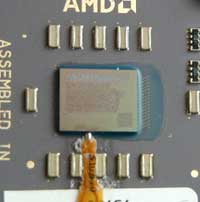
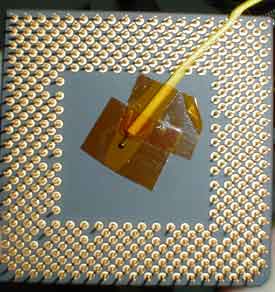
DESKTOP
Intel Core i7 920 | ASUS Sabertooth X58 | Corsair Dominator 1600 6GB | Noctua NH-U12P SE | nVidia GeForce Zotac AMP GTX480 | ASUS VE278Q 27" 1920x1080 | Western Digital VelociRaptor 300GB | Samsung HD502HJ 500GB | Antec Twelve Hundred | Antec CP-850 | Logitech MX518 | Logitech Illuminated Keyboard | Logitech G13 | Windows 7
LAPTOP
ASUS G73JW-XA1 | Intel i7-740QM | nVidia GTX 460M | 8GB DDR3 1333MHz | Intel X25-M G2 160GB | Seagate Momentus 750GB | Intel 6200 | Windows 7
 Posting Permissions
- You may not post new threads
- You may not post replies
- You may not post attachments
- You may not edit your posts
-
Forum Rules
|
|


 Reply With Quote

