|
-
Reef Shark

Very Stupid Question
I just got an Antec P180B case (loooks awesome  ) but I have no clue how to mount the lower optional fan!?!? any pics someone? I know this is a very stupid question but I have aboslutely no idea how to get the fan inside that compartment. ) but I have no clue how to mount the lower optional fan!?!? any pics someone? I know this is a very stupid question but I have aboslutely no idea how to get the fan inside that compartment.
If your good to it, It will be good to you.
CPU: Core 2 Extreme X6800
MOBO: Asus P5B Deluxe
RAM: 4GB G.Skill PC6400
VC: EVGA Geforce 7950GX2 1GB
HDD: 2x150mb Raptor (Raid0) + 2x750gb Seagate
SC: Creative X-Fi Fatality
-
Zoom-Zoom!

There should be a black piece of plastic. If you pull it gently towards you, it will unlatch and come out. There are mounting holes in this plastic piece for the fan. Mount the fan to the plastic piece, then put entire thing back into the case. (line up latches on the plastic piece then push away from you to lock) You want the fan blowing towards the powersupply.
Below is a pic of that plastic thing. (large thing in the middle)

P.S. If you look on the top right of my pic, there is another black plastic thing for a front intake on the upper chamber if you have an extra fan. The same procedure would be followed.
Last edited by soupnazi; 07-23-2006 at 02:24 AM.
-
Reef Shark
I knew about that one, I was talking about this space:
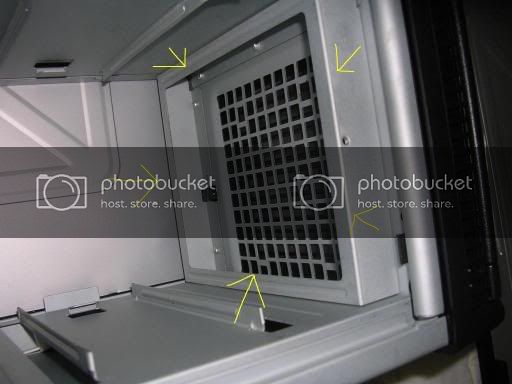
I was under the impression that you could mount a fan in that hole.
If your good to it, It will be good to you.
CPU: Core 2 Extreme X6800
MOBO: Asus P5B Deluxe
RAM: 4GB G.Skill PC6400
VC: EVGA Geforce 7950GX2 1GB
HDD: 2x150mb Raptor (Raid0) + 2x750gb Seagate
SC: Creative X-Fi Fatality
-
Zoom-Zoom!
Oh, I was actually looking for info on that one myself. By default, it isn't meant to hold a fan. I remember seeing a guy who modded it to fit a fan but I can't find the info.
EDIT: I found it but wouldn't recommend it. (he had to drill out the rivets and take out that metal piece) If you have a thin profile 80mm or 90mm fan, you could attach it with zip ties to the grate. (then you won't have to remove the metal box since it will fit inside it)
http://www.hardforum.com/showthread.php?t=936507
Last edited by soupnazi; 07-23-2006 at 11:02 AM.
-
Reef Shark
Thats too bad, I wanted to put one in there to cool my hard drives.
If your good to it, It will be good to you.
CPU: Core 2 Extreme X6800
MOBO: Asus P5B Deluxe
RAM: 4GB G.Skill PC6400
VC: EVGA Geforce 7950GX2 1GB
HDD: 2x150mb Raptor (Raid0) + 2x750gb Seagate
SC: Creative X-Fi Fatality
-
Zoom-Zoom!
The included bottom middle fan should be enough to suck air in from the front and over the hdd's.
Last edited by soupnazi; 07-23-2006 at 11:21 AM.
-
...

cant you just drill a few smaller holes and fix it with tyraps ?
----------
Intel QX6700 Tuniq Tower (3,30Ghz) |Intel D975XBX2 |4x 1GB OCZ Platinum XTC DDR2-6400
Gigabyte 8800Ultra OC'd to (650/2200/1605)| X-fi XtremeGamer Fatal1ty Pro | Dell 2005 FPW
Lian-Li v1000 plus| Silverstone ST56ZF 560W |WD Raptor 150GB |2x Seagate 7200.10 320GB
----------
-
Zoom-Zoom!
 Originally Posted by Reign
cant you just drill a few smaller holes and fix it with tyraps ?
You could but there is a harddrive mounting box that slides into place right behind it. If you put a fan on top of that metal frame, you won't be able to put the hdd bay back in. (fan will block the hdd box)
You could put a smaller fan within the metal frame OR remove the frame like that guy from Hardforums did & install a 120mm fan.
Last edited by soupnazi; 07-23-2006 at 03:35 PM.
 Posting Permissions
- You may not post new threads
- You may not post replies
- You may not post attachments
- You may not edit your posts
-
Forum Rules
|
|


 Reply With Quote


