|
-
Catfish

Want to get rid of "computer is locked" message upon startup
HI,
1) I bought this laptop used recently, and it's sort of annoying to get this message because I need to come back to the computer to hit enter key to have my system boot up the rest of the way. It says, "this computer is in use and has been locked. Only user xxxx\Administrator or an administrator can unlock this computer." User name is Administrator, BTW. Nice of them not to put a password in. anyway, how can I get rid of this, and how do I let the computer know that I am the administrator and can do anything I want with it?
2) Please tell me where I go to look at how much RAM I have, what type it is, etc. I have a stick of RAM made by Kingston KTT-SO100/128 and am wondering if it will fit. I know that there has to be a certain slot available in order to upgrade RAM. Also, where is my RAM located, under the keyboard?
Thanks!
Lins
-
There is a checkbox in the screen saver dialog.
Memory stick locations depend on the exact model of notebook computer.
Most have a 2 stick capability with either a 2GB or 4GB max memory size.
Many have a removable panel on the bottom of the case that provides access to 1 or 2 memory sticks .
If there is only 1 stick accessible from the bottom, the other will be located under the keyboard.
Last edited by ua549; 10-22-2008 at 11:12 AM.
-
Catfish
Hi ua,
You say, "There is a checkbox in the screen saver dialog." No, I went to Display Properties and under Screen Saver, there is nothing ticked for "Password protected". That's the only box option that is available. I'm trying to get rid of the window upon bootup that has a window with Administrator as the username and nothing in the password (I can just hit enter to resume bootup). Any other ideas?
-
Administrator

Click Start->run and type: control userpasswords2
Uncheck user must enter a password....
"Vegetarians live up to nine years longer than the rest of us...Nine horrible, worthless, baconless years."
-
Mako Shark

 Originally Posted by linsjean

HI,
2) Please tell me where I go to look at how much RAM I have, what type it is, etc. I have a stick of RAM made by Kingston KTT-SO100/128 and am wondering if it will fit. I know that there has to be a certain slot available in order to upgrade RAM. Also, where is my RAM located, under the keyboard?
Thanks!
Lins
KTT-SO100/128 indicates kingston so dimm pc100, 128MB
Your system is compatible with PC100 ram and possibly pc133. Both are very expensive. You'll probably find you'll only have 256MB-512MB supported per slot.
Compaq A910em: T2330 dual core 1.6Ghz, X3100 384MB GPU, 160GB sata HDD, 2GB RAM
Gaming rig: Asus Striker II, Coolermaster GX 750w, E4600 @ 2.4Ghz, 2.5GB RAM, Zerotherm FZ 120, 9500GT 1GB
Server: Mac mini running W23k Server - 1.8Ghz dual-core, 1GB RAM, 1x80GB, 2x500GB externals + LTO1 tape backup
An important petition, regarding your human rights:
https://www.change.org/en-GB/petitio...r-both-genders
-
Catfish
Originally Posted by Steve R Jones
Click Start->run and type: control userpasswords2
Uncheck user must enter a password....
I tried this and nothing hapened. No error, no window popped up, nothing. Can I go in manually into control panels and uncheck something?
-
Administrator
Did you do it for ALL users?
"Vegetarians live up to nine years longer than the rest of us...Nine horrible, worthless, baconless years."
-
Mako Shark
If you have your own copy of windows, or the license sticker is underneath, can you re-install/repair the windows installation to get rid of the last users settings?
Compaq A910em: T2330 dual core 1.6Ghz, X3100 384MB GPU, 160GB sata HDD, 2GB RAM
Gaming rig: Asus Striker II, Coolermaster GX 750w, E4600 @ 2.4Ghz, 2.5GB RAM, Zerotherm FZ 120, 9500GT 1GB
Server: Mac mini running W23k Server - 1.8Ghz dual-core, 1GB RAM, 1x80GB, 2x500GB externals + LTO1 tape backup
An important petition, regarding your human rights:
https://www.change.org/en-GB/petitio...r-both-genders
-
Catfish
Originally Posted by Steve R Jones
Did you do it for ALL users?
What I did is followed your instructions to click Start>Run and type control userpasswords2. That did nothing. So manually, I clicked on My Computer, then Control Panel and found User and Passwords. I went in there and there are 3 users "administrator" "guest" and something else.l There really is no place in there to uncheck a box for passwords.
wh666: I bought this computer from a store that refurbishes computers that people donate. They wipe out everything and install the OS from scratch.
-
Catfish
BTW folks, I have Windows 2000 Pro. I do NOT have XP. So the "run" command may not work at all that you gave me with my OS.
-
Catfish
I discovered that what I needed to type was control password -- there are lots of variations, so this has been resolved, but many of you helped me find my way, thanks!
-
Catfish
Memory?
Originally Posted by wh666-666
KTT-SO100/128 indicates kingston so dimm pc100, 128MB
Your system is compatible with PC100 ram and possibly pc133. Both are very expensive. You'll probably find you'll only have 256MB-512MB supported per slot.
1. What menu do I go to, to locate the specs on my PC, like how much memory is installed in it right now?
2. I have this RAM that I stated above and you say my system is compatible with PC100, so it will work, right? The memory I got came out of a Satellite laptop. One slot went bad, so a shop took it out and gave it to me. It works good though, want to add it to my Dell.
-
Mako Shark
Oh right, sorry i thought you meant you had that stick installed already.
Download everest and run it:
http://majorgeeks.com/downloadget.ph...c13fc5b7062019
Clicking here, on SPD in the pic, will show you exact details of memory stick(s) installed. You need to note the PC number and clock speed (eg: 133mhz)

Here, you will see circled your motherboard name/computer details, which will be necessary for determining what memory and capacity you need and how many free slots you have:
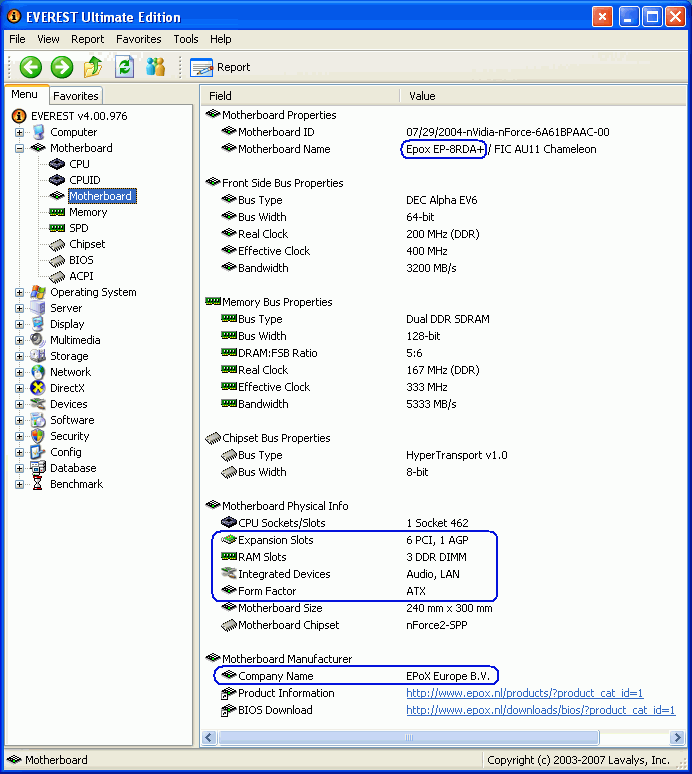
Compaq A910em: T2330 dual core 1.6Ghz, X3100 384MB GPU, 160GB sata HDD, 2GB RAM
Gaming rig: Asus Striker II, Coolermaster GX 750w, E4600 @ 2.4Ghz, 2.5GB RAM, Zerotherm FZ 120, 9500GT 1GB
Server: Mac mini running W23k Server - 1.8Ghz dual-core, 1GB RAM, 1x80GB, 2x500GB externals + LTO1 tape backup
An important petition, regarding your human rights:
https://www.change.org/en-GB/petitio...r-both-genders
-
Mako Shark
As for being compatible though, I wouldnt know since I dont know your exact model number. The above step though gives you all the information you need.
However on a hunch, most old latitudes are compatible with either pc100 or pc133 or both.
Compaq A910em: T2330 dual core 1.6Ghz, X3100 384MB GPU, 160GB sata HDD, 2GB RAM
Gaming rig: Asus Striker II, Coolermaster GX 750w, E4600 @ 2.4Ghz, 2.5GB RAM, Zerotherm FZ 120, 9500GT 1GB
Server: Mac mini running W23k Server - 1.8Ghz dual-core, 1GB RAM, 1x80GB, 2x500GB externals + LTO1 tape backup
An important petition, regarding your human rights:
https://www.change.org/en-GB/petitio...r-both-genders
-
Catfish
wh666,
Thanks. I ran the report. I have the Home Edition (not the Ultimate Edition) so some things are not listed in the report I ran. Is there any way I can send you my report and you figure this all out? It doesn't tell me the number of slots, etc. How can I do snapshots like you did and insert them on this site?
Tags for this Thread
 Posting Permissions
- You may not post new threads
- You may not post replies
- You may not post attachments
- You may not edit your posts
-
Forum Rules
|
|


 Reply With Quote


