Custom Built NAS Server - Page 2

Sharky Forums


Page 2 of 5 FirstFirst 1234 ... LastLast
Results 16 to 30 of 70

Thread: Custom Built NAS Server

  1. #16
    Great White Shark
    Join Date
    Nov 2000
    Location
    Alpharetta, Denial, Only certain songs.
    Posts
    9,925
    Quote Originally Posted by Colossus View Post
    I have wanted to try openfiler but my NAS box has a custom commercial stripped down linux version.

    So the firmware is on the egg's site? Have a link? Probably find it before you post the link =) I have 8 drives to update then =/
    http://promotions.newegg.com/files/8h_SD1A.zip

    Crusader for the 64-bit Era.
    New Rule: 2GB per core, minimum.

    Intel i7-9700K | Asrock Z390 Phantom Gaming ITX | Samsung 970 Evo 2TB SSD
    64GB DDR4-2666 Samsung | EVGA RTX 2070 Black edition
    Fractal Arc Midi |Seasonic X650 PSU | Klipsch ProMedia 5.1 Ultra | Windows 10 Pro x64

  2. #17
    Great White Shark
    Join Date
    Nov 2000
    Location
    Alpharetta, Denial, Only certain songs.
    Posts
    9,925
    First pictures.

    PicoPSU power supply. It's 120w of pure DC goodness. You can see the input port (white and black wires) that takes the DC input from the external power brick. It's much like a laptop's power supply in how it works. (Takes 12v DC input, and steps it down for the 5v and 3.3v rails.)


    The Low profile RAM and PCIe riser arrived today.

    First off the RAM.

    It's gonna be sweet. It's low enough that it might not even clear the DIMM slots when the tabs are up!


    Next the PCIe riser. Not much to say. If this guy is too low I'll end up switching to one of the flexible ribbon PCIe risers.


    A shot of it all together.
    Last edited by James; 12-22-2008 at 02:10 PM.

    Crusader for the 64-bit Era.
    New Rule: 2GB per core, minimum.

    Intel i7-9700K | Asrock Z390 Phantom Gaming ITX | Samsung 970 Evo 2TB SSD
    64GB DDR4-2666 Samsung | EVGA RTX 2070 Black edition
    Fractal Arc Midi |Seasonic X650 PSU | Klipsch ProMedia 5.1 Ultra | Windows 10 Pro x64

  3. #18
    Great White Shark
    Join Date
    Nov 2000
    Location
    Alpharetta, Denial, Only certain songs.
    Posts
    9,925
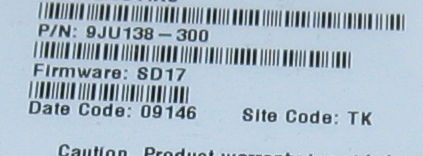
    The hard drives arrived last night. Unfortunately, they are the SD17 firmware, which means I will be flashing them. But that is a small price to pay.


    Here's the heart of my 4TB RAID5 array.


    Last edited by James; 12-23-2008 at 10:30 AM.

    Crusader for the 64-bit Era.
    New Rule: 2GB per core, minimum.

    Intel i7-9700K | Asrock Z390 Phantom Gaming ITX | Samsung 970 Evo 2TB SSD
    64GB DDR4-2666 Samsung | EVGA RTX 2070 Black edition
    Fractal Arc Midi |Seasonic X650 PSU | Klipsch ProMedia 5.1 Ultra | Windows 10 Pro x64

  4. #19
    By the Power of Greyskull Colossus's Avatar
    Join Date
    Jul 2002
    Location
    Boston, MA
    Posts
    21,140
    Looks great

    I downloaded the firmware, just havent flashed it yet. Its a bit of work...

    Intel I9 14900K|ASUS - MAXIMUS Z790 HERO|ASUS GTX 1080 Ti|64GB G.Skill|(3) Samsung 990 Pro 4TB NVME |Custom water cooling||Alienware AW3423DW 34" OLED

    288TB Plex server (UNRAID)
    (16) WD Red Pro 20TB

  5. #20
    Great White Shark
    Join Date
    Nov 2000
    Location
    Alpharetta, Denial, Only certain songs.
    Posts
    9,925
    Quote Originally Posted by Colossus View Post
    I downloaded the firmware, just havent flashed it yet. Its a bit of work...
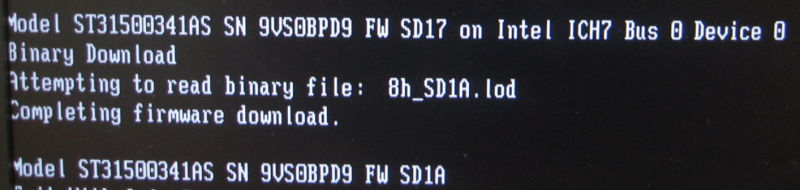
    It's actually not so bad. I downloaded the SeatoolsFloppy creator .exe. I ran it, then deleted the actual seatools from it, leaving me with a FreeDOS boot floppy. There are easier ways, but I'm at work and options are limited.

    I then copied the files over to the floppy and booted from it with only the drive I was flashing attached to the SATA controller on the motherboard.

    One command and 2 minutes later the drive was updated. Rinse and repeat 4 times for 4 ready to use SD1A firmware based hdd's.

    Here's a quick shot of the important part of the procedure for those who don't want to check out the blown up and blurry versions of those screens. (Sorry, flash didn't work, and I don't have a steady hand.)


    And the details of each drive flash, for any who are interested.


    Last edited by James; 12-23-2008 at 12:38 PM.

    Crusader for the 64-bit Era.
    New Rule: 2GB per core, minimum.

    Intel i7-9700K | Asrock Z390 Phantom Gaming ITX | Samsung 970 Evo 2TB SSD
    64GB DDR4-2666 Samsung | EVGA RTX 2070 Black edition
    Fractal Arc Midi |Seasonic X650 PSU | Klipsch ProMedia 5.1 Ultra | Windows 10 Pro x64

  6. #21
    Great White Shark
    Join Date
    Nov 2000
    Location
    Alpharetta, Denial, Only certain songs.
    Posts
    9,925
    Christmas is somewhat early for me!

    Got the hotswap cage and CF card in today. So right after I flash the firmware on the drives, I was able to install them. I have to say that I'm a Supermicro fanboy. Their build quality is always top notch, and their thermal design is excellent.

    CF card. Nothing fancy, other than the 30MBps Extreme III rating. While it should matter once the OS is loaded, during the load I do want at least slow laptop drive speeds.


    And out of the packaging.


    Obligatory box pics. This box is huge. It made me worry about the size of the enclosure.


    Out of the box the cage is much more reasonable in size. It's actually smaller than I expected. Supermicro's manual is thin, but accurate and complete enough that they didn't need anything more.


    A closer look at the accessories. It comes with SATA cables, screws, labels for the drive trays, and a lead to connect the backplane LED's to the activity leads on the RAID controller.

    *note the loose drive caddy labels in the screw bag. It took me a bit to find that 2 label again.
    Last edited by James; 12-23-2008 at 01:56 PM.

    Crusader for the 64-bit Era.
    New Rule: 2GB per core, minimum.

    Intel i7-9700K | Asrock Z390 Phantom Gaming ITX | Samsung 970 Evo 2TB SSD
    64GB DDR4-2666 Samsung | EVGA RTX 2070 Black edition
    Fractal Arc Midi |Seasonic X650 PSU | Klipsch ProMedia 5.1 Ultra | Windows 10 Pro x64

  7. #22
    Great White Shark
    Join Date
    Nov 2000
    Location
    Alpharetta, Denial, Only certain songs.
    Posts
    9,925
    Here's all of the drive caddies pulled out in the "fan out" style that is popular to show off your hot swap goodness on websites.


    Inside the cage you can see Supermicro has made quite a few large holes in the PCB to allow for airflow. I've seen and used lesser cages where a hotswap enclosure like this has a solid backplane.


    Here are two quick shots of the back, one with the fan attached, and one with it removed. It's a quick attach enclosure, making it easy to swap out or remove in my case.


    Reading the manual I discovered that it is possible to remove not only the fan, but the backplate as well. This is done so you can access the backplane for replacement, etc. I'm going to be removing it because it is one less obstruction between fresh air and the fan I'm planning on putting in the back. Which reminds me.... I need to order that fan. lol

    Last edited by James; 12-23-2008 at 02:03 PM.

    Crusader for the 64-bit Era.
    New Rule: 2GB per core, minimum.

    Intel i7-9700K | Asrock Z390 Phantom Gaming ITX | Samsung 970 Evo 2TB SSD
    64GB DDR4-2666 Samsung | EVGA RTX 2070 Black edition
    Fractal Arc Midi |Seasonic X650 PSU | Klipsch ProMedia 5.1 Ultra | Windows 10 Pro x64

  8. #23
    Great White Shark
    Join Date
    Nov 2000
    Location
    Alpharetta, Denial, Only certain songs.
    Posts
    9,925
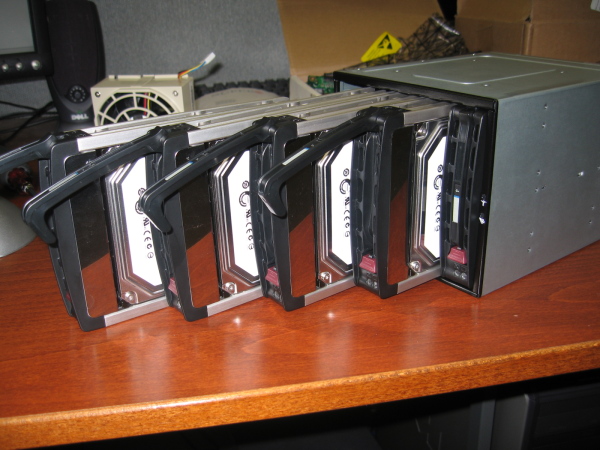
    I really like Supermicro drive caddies. They are simple, effective, and promote good ventilation in the enclosure.
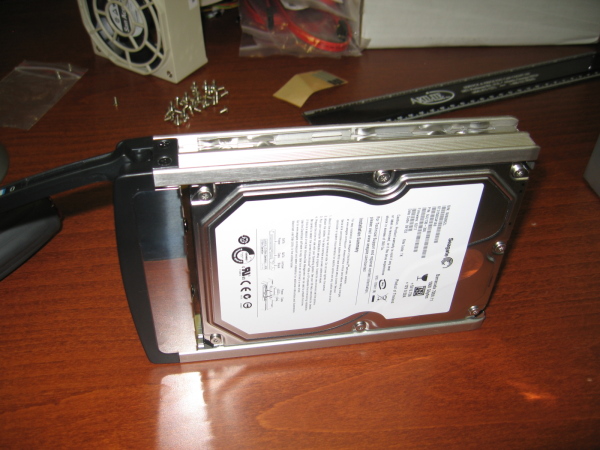

    Finally, the shots of the actualy drives being inserted into the cage, again in the fanout pattern.
    Crusader for the 64-bit Era.
    New Rule: 2GB per core, minimum.

    Intel i7-9700K | Asrock Z390 Phantom Gaming ITX | Samsung 970 Evo 2TB SSD
    64GB DDR4-2666 Samsung | EVGA RTX 2070 Black edition
    Fractal Arc Midi |Seasonic X650 PSU | Klipsch ProMedia 5.1 Ultra | Windows 10 Pro x64

  9. #24
    By the Power of Greyskull Colossus's Avatar
    Join Date
    Jul 2002
    Location
    Boston, MA
    Posts
    21,140
    Very nice.. That dock looks a lot like my IcyDock 5-port SATA that I have. How much did that set you back? I like the mounts and latch better on your version =/

    Intel I9 14900K|ASUS - MAXIMUS Z790 HERO|ASUS GTX 1080 Ti|64GB G.Skill|(3) Samsung 990 Pro 4TB NVME |Custom water cooling||Alienware AW3423DW 34" OLED

    288TB Plex server (UNRAID)
    (16) WD Red Pro 20TB

  10. #25
    Great White Shark
    Join Date
    Nov 2000
    Location
    Alpharetta, Denial, Only certain songs.
    Posts
    9,925
    It cost $109 with ~$14 shipping.

    It's heavy, which explains why it costs so much to ship. I'd estimate the weight at around 6 lb's or so, unloaded.

    *Edit: I don't know if I paid that much in shipping, since I bought it with other items, but if you place it in your cart on it's own, that's what it comes out to on Newegg.

    **Edit Again: Yate Loon 140mm fan and a chrome grill ordered from FrozenCPU. Should be here around the turn of the year. (Next week.) Still not sure if I'm going to go with the T7200, or the T5600. The difference is the extra 2MB of cache for the cores to share, and 166MHz of speed, which is negligible.
    Last edited by James; 12-23-2008 at 06:26 PM.

    Crusader for the 64-bit Era.
    New Rule: 2GB per core, minimum.

    Intel i7-9700K | Asrock Z390 Phantom Gaming ITX | Samsung 970 Evo 2TB SSD
    64GB DDR4-2666 Samsung | EVGA RTX 2070 Black edition
    Fractal Arc Midi |Seasonic X650 PSU | Klipsch ProMedia 5.1 Ultra | Windows 10 Pro x64

  11. #26
    Hammerhead Shark TAZTG's Avatar
    Join Date
    Jun 2001
    Location
    Brunswick, MD
    Posts
    2,153
    Gotta love all the HD Space..

  12. #27
    Great White Shark
    Join Date
    Nov 2000
    Location
    Alpharetta, Denial, Only certain songs.
    Posts
    9,925
    Quote Originally Posted by TAZTG View Post
    Gotta love all the HD Space..
    TAZTG, knowing that I live in an apartment and have limited access to tools, what would you suggest for thin metal bending and shaping? I'm thinking about trying to make the main shell of the case myself, as it will be a simple 2-bend process, but I still want it to be professional in appearance when I'm done.

    Also, I'm thinking about simply cutting a hole in the bottom section of the front plate and putting in a mesh or screen material. I want the airflow to be drawn front to back over the motherboard that will reside below the drive enclosure.

    Will that look tacky? Should I try and have the metal shop do everything for me?

    Crusader for the 64-bit Era.
    New Rule: 2GB per core, minimum.

    Intel i7-9700K | Asrock Z390 Phantom Gaming ITX | Samsung 970 Evo 2TB SSD
    64GB DDR4-2666 Samsung | EVGA RTX 2070 Black edition
    Fractal Arc Midi |Seasonic X650 PSU | Klipsch ProMedia 5.1 Ultra | Windows 10 Pro x64

  13. #28
    Hammerhead Shark TAZTG's Avatar
    Join Date
    Jun 2001
    Location
    Brunswick, MD
    Posts
    2,153
    I am not much of a Metal Shop expert. It would depend on what kind of bending and shaping your talking about. I would suppose you need a good work bench with Vises and Clamps. Just Googled Metal Shop Tool, whoa pretty expensive stuff. Looks like you professional could be cheaper in the long run..

  14. #29
    Great White Shark
    Join Date
    Nov 2000
    Location
    Alpharetta, Denial, Only certain songs.
    Posts
    9,925
    I'm willing to give the outer shell a shot.

    For the front panel though, I think I'm going to go with something like this.

    Thanks for the heads up. Merry Christmas!

    Crusader for the 64-bit Era.
    New Rule: 2GB per core, minimum.

    Intel i7-9700K | Asrock Z390 Phantom Gaming ITX | Samsung 970 Evo 2TB SSD
    64GB DDR4-2666 Samsung | EVGA RTX 2070 Black edition
    Fractal Arc Midi |Seasonic X650 PSU | Klipsch ProMedia 5.1 Ultra | Windows 10 Pro x64

  15. #30
    is an angry person AstroCreep's Avatar
    Join Date
    Sep 2002
    Location
    Akron, OH USA
    Posts
    3,464
    Quote Originally Posted by James View Post
    ...I have to say that I'm a Supermicro fanboy. Their build quality is always top notch, and their thermal design is excellent...
    Same here; they make really good stuff. I was working for a home improvement/manufacturing company a few years ago, and due to the low amount of available funds (but the necessity for new hardware) we bought a number of the "SuperServers". The best thing, IMO, is that you aren't locked-in to proprietary HDDs because of the HDD chassis; just stick your favorite brand in adn take it from there!
    Their support people can be tough to get a hold of, but they take good care of you.

    I like your idea here. Keep up the good work!
    Asus Maximus III Formula | Core i5 650 | Xigmatek Dark Knight | 8GB G.Skill Ripjaws DDR3-1600 | eVGA GeForce GTX 570 SuperClocked | OCZ Vertex 2 120GB, Western Digital Caviar Black 640GB | Corsair HX Series 750w | CoolerMaster HAF 932
    My Heatware

Posting Permissions

  • You may not post new threads
  • You may not post replies
  • You may not post attachments
  • You may not edit your posts
  •