|
-
Great White Shark

Does 3Dmark scores show system performance
Here are a few scores, i just want to know if they are in par with system in sig. cpu at 3GH and 4890 at 950/1000. vantage 12520, 06 18502 and 05 24553. I didn`t make any changes just run them the way they were.
Last edited by lonewolfroger; 11-22-2009 at 11:22 AM.
i7 920 @3GH, P6T Deluxe V2, OCZ HP 6GB(3x2)Kit(7-7-7-16), 128GB Patriot SSD, 250GB SATA(7200)Hitachi, WD 500gb, 1000W BFG PSU, SATA Pioneer DVD CD burner, XFX5870 XXX edition(900/1300), LG LED 2350V, XFI Titanium Fatal1ty champion, Logitech X-540, Lian Li PC-B70 Full Tower Case, Win7 HP.
-
Old School OCer

If that was for "V"antage "P"erformance then those scores are OK for your system at stock. It's Vantage, not Advantage 
Here's some stuff that will help you after you get your vidcards:
OCing your vidcards will be different than I show below, so you'll need to make the matches to the ATI control panel.
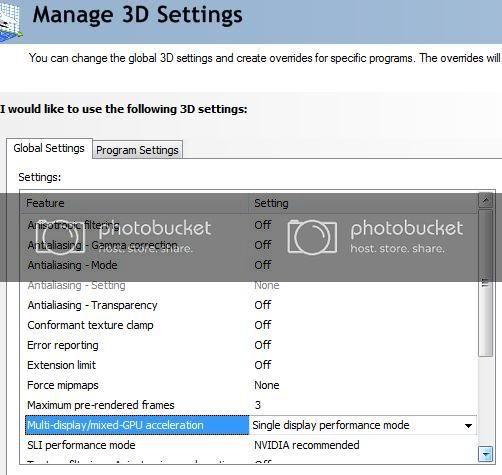
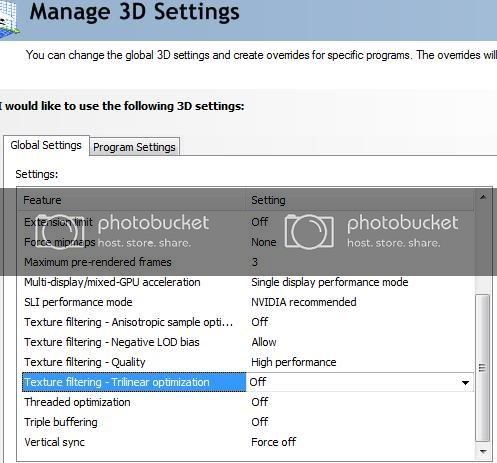
**** WARNING WARNING you MUST have excellent cpu cooling ****
The following BIOS settings got me to 4.2Ghz, see recommendation below on how I got there. And your D0 step cpu will take less voltage.
C1E: disable
Hardware Prefetcher: disable
Adjacenct Cache: disable
Intel VT: disable
CPU TM: disable
Exceute Disable Bit: disable
Intel HT: Enable
Active Processore Cores: Enable
A20M : disable
Intel Speed Step: Enable ( *Turbo On Multiple @ 21)
Intel Turbo Mode: Enable ( *Turbo On Multiple @ 21)
Intel C-STATE: disable
Set your memory timings to those recommended by maker and Vdimm to 1.65
CPU Ratio Setting: Auto
BCLK: 200Mhz
PCIE: 100Mhz
DRAM: 1600Mhz (I'm using DDR3 1600 ram, your's may be different)
Vcore: 1.45V
CPU Pll: auto
QPI/DRAM: auto
IOH: auto
IOH PCIE: auto
ICH: auto
ICH PCIE: auto
DRAM Bus: 1.64V
Load-Line Calibration: Enable
CPU Clock Skew: auto
CPU Spread Spectum: Disable
IOH Clock Skew: auto
PCIE Spread Spectum: Disable
Bump up Vcore one notch from stock (1.08) and set Bclk to 140. Boot and make sure you're stable (Prime95??? or your app of choice). Keep cpu temp at or below 74c. Then slowly move up to 4.2Ghz by bumping Bclk 10Mhz at a time up to 180, then by 5Mhz to 200, booting after each bump and checking stability. For each bump in Bclk bump Vcore two notches up to 1.45. Check DRAM Freq at each bump in Bclk to be sure you are at or below max freq for your memory.
Last edited by OS-Wiz; 11-22-2009 at 08:08 AM.
The Money Trap = Intel i7 930 | Corsair H70 | ASUS P6X58D-E | 3 x 2GB G.Skill DDR3 2000 6-9-6-24 | EVGA GTX 580 DS SC | OCZ Vertex 2 90GB SSD | WD VelociRaptor | Klipsch ProMedia | Cooler Master HAF 932 | Antec TPQ-1200W | Dell U2711 2560 x 1440 27" | Windows 7 Ultimate 64-bit | APC RS1500
-
Great White Shark
Thanks, right now it looks like the 5970`s will be in stock before the 5870`s and you will only be able to buy one 5870 when they are in stock.
i7 920 @3GH, P6T Deluxe V2, OCZ HP 6GB(3x2)Kit(7-7-7-16), 128GB Patriot SSD, 250GB SATA(7200)Hitachi, WD 500gb, 1000W BFG PSU, SATA Pioneer DVD CD burner, XFX5870 XXX edition(900/1300), LG LED 2350V, XFI Titanium Fatal1ty champion, Logitech X-540, Lian Li PC-B70 Full Tower Case, Win7 HP.
 Posting Permissions
- You may not post new threads
- You may not post replies
- You may not post attachments
- You may not edit your posts
-
Forum Rules
|
|


 Reply With Quote

