|
-
issue with CPU themal heatsink /fan
I've put one of these on just now:
http://www.akasa.com.tw/update.php?t...r&model=AK-967
But i'm concerned about the direction the fan is facing.
It looks like i've got mine facing the wrong way.
I presume this is going to be a problem?
Last edited by jman0war; 11-24-2009 at 04:13 PM.
-
Administrator

HINT: we can see your pc from here - you're typing on the INTERNET
Second hint: Tell us which direction you have it facing.
-
Old School OCer

 Originally Posted by Steve R Jones

HINT: we can see your pc from here - you're typing on the INTERNET
Second hint: Tell us which direction you have it facing.
LOL 
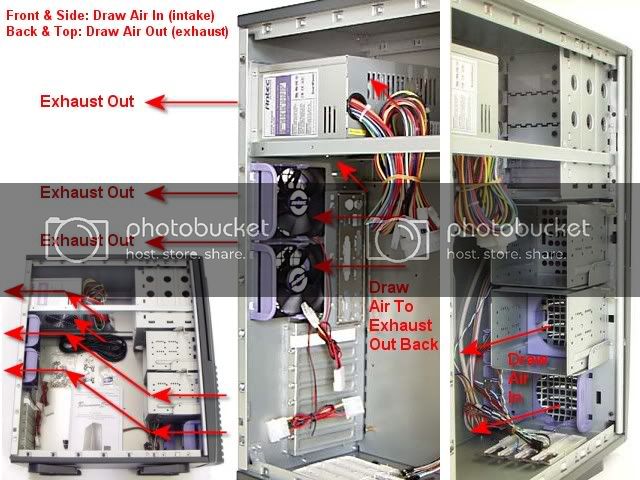
It should blow into the HS and out the back of the case.
The Money Trap = Intel i7 930 | Corsair H70 | ASUS P6X58D-E | 3 x 2GB G.Skill DDR3 2000 6-9-6-24 | EVGA GTX 580 DS SC | OCZ Vertex 2 90GB SSD | WD VelociRaptor | Klipsch ProMedia | Cooler Master HAF 932 | Antec TPQ-1200W | Dell U2711 2560 x 1440 27" | Windows 7 Ultimate 64-bit | APC RS1500
-
pointing to the top of the case is okay too if there is fan up there, or maybe even just a big vent.
I think I just pooched a HS mounting...always do in some small way at least.
Mine: Core i7-920 + Xigmatek S1283 // Gigabyte UD4P // gigabyte windforce hd6870 // 3x2GB Corsair DDR3-1333 // Antec 900 V2 // Corsair TX750 // WD 640GB Cav. blue // Samsung TOC T240 24"
kids: PhII 550 BE (quad unlocked) + freezer pro 64 // Gigabyte UD2H // 2x2GB Corsair DDR3-1600 // CM Centurion 5 // gtx260-216 // Corsair HX620 // WD 640GB Cav. black // some 22" monitor
-
sorry wasn't clear.
THis cooler is odd.
For one, the fan and heat sink do not face down onto the CPU, rather when mounted, the heatsink and fan are perpendicular to teh cpu.
If you open my link from above, you'll see a pic of the completed assembly.
This thing sits ontop of the cpu as pictured in the banner.
The black plastic fan is mounted onto the metal part by way of 4 rubber fasteners (you do this yourself). I was concerned because i believed i mounted the fan facing the wrong direction.
The instructions are not clear about this.
So i took great care to disassemble and reverse the direction the fan is facing.
So now my fan blades match what is shown in the picture on the website.
That was my big concern.
You can have this assembly facing the ram sticks, or the other direction - facing the rear of your case.
I've removed the large fan from the back side of my case, and basically have just left the hole; while this cpu/heatsink fan is just inside there. If you follow me...
Last edited by jman0war; 11-25-2009 at 07:40 AM.
-
the cpu heatsink fan is not going to be enough to push air out the vent in the back of the case. Put that rear fan back on, blowing out. The sticker on the fan hub is usually on the intake side, the wires going into the back of the hub are on the outlet side.
And no, the cooler design is not odd in the least, it is very common for performance coolers. Its remarkable that you didn't seem to know this before buying it.
Mine: Core i7-920 + Xigmatek S1283 // Gigabyte UD4P // gigabyte windforce hd6870 // 3x2GB Corsair DDR3-1333 // Antec 900 V2 // Corsair TX750 // WD 640GB Cav. blue // Samsung TOC T240 24"
kids: PhII 550 BE (quad unlocked) + freezer pro 64 // Gigabyte UD2H // 2x2GB Corsair DDR3-1600 // CM Centurion 5 // gtx260-216 // Corsair HX620 // WD 640GB Cav. black // some 22" monitor
-
Old School OCer
I looked at picture (typical mount for the newer style HSFs) and as I said before, the fan should be blowing into the HS and out the back of the case. Put the case fan back into the back panel.
The Money Trap = Intel i7 930 | Corsair H70 | ASUS P6X58D-E | 3 x 2GB G.Skill DDR3 2000 6-9-6-24 | EVGA GTX 580 DS SC | OCZ Vertex 2 90GB SSD | WD VelociRaptor | Klipsch ProMedia | Cooler Master HAF 932 | Antec TPQ-1200W | Dell U2711 2560 x 1440 27" | Windows 7 Ultimate 64-bit | APC RS1500
-
Originally Posted by fluffmonster
The sticker on the fan hub is usually on the intake side, the wires going into the back of the hub are on the outlet side.
There are stickers on both sides of this fan's hub.
One of which looks like a bit "hologramish", and that's the one i've got facing out.
The wires of the fan are now on the side facing the heatsink. This is what threw me initially as i thought surely the wires shouldn't be nearest the heat source.
There's a pdf here of installation instructions:
http://www.akasa.com.tw/download/man...n%20manual.pdf
See Step 5
I'm only going by what is pictured, making sure the blades of my fan point the same way.
Thankfully i could zoom in on the image in pdf format, as the printed out instructions are woeful.
Originally Posted by fluffmonster
And no, the cooler design is not odd in the least, it is very common for performance coolers. Its remarkable that you didn't seem to know this before buying it.
It's odd in respect that it seems most coolers are not oriented using this perpendicular design. Indeed the cooler that ships with every processor i've ever seen, has been of the top-down variety.
Why i didn't know about this when i made my purchase?
What can i say, i was ordering my processor and at the bottom of the page it had "recommended cpu coolers", I bought one that was not the very cheapest but also not the most expensive, emphasized that it was "quiet" and had good review. Go figure.
-
Here's some pics of my computer.
This one shows the orientation of the cooler, and the hole at the back of the pc.
http://photos4.pix.ie/3F/E6/3FE668BC...D99681-800.jpg
This one shows the case fan installed. Seems a little close doesn't it?
If that fan is moving air out then won't it mess with the air flow of the cooler fan blowing IN?
It's basically 2 fans blowing in opposite directions of each other.
I don't know, it looks a bit sus to me.
http://photos5.pix.ie/86/70/867039AE...ED928E-800.jpg
-
Mako Shark

Important is that as stated before that your fan pushes air trough the heatsink. from there on just experiment, I would say use the opposing fan as an intake and provide cooler air to the heatsink fan.
Make sure to have another exhaust fan somewhere.
If you want to be adventures put the fan on the other side of the heatsink, then use the case fan to exhaust the warm CPU heated air.
I feel that they should be moving air in the same direction.
GA-MA790GPT-UD3H, AMD Phenom ll 955,
Lian Li PC-60 PLUS, HD5850
----------------
Resist the devil, and he will flee from you!
"Congress shall make no law respecting an establishment of religion."
When thou seest an eagle, thou seest a portion of genius; lift up thy head!
2kr1b1r/Bpp3pp/1N2p1n1/4p1q1/4P3/2Q5/PPP2PPP/3R1RK1 b - - 6 15
-
Old School OCer
Originally Posted by jman0war
LOL, flip the HSF 180 deg. and make sure the fan is blowing into the HS. Some fans have a little arrow on them to indicate direction of air flow. The back panel fan should be sucking air out of the case.
The Money Trap = Intel i7 930 | Corsair H70 | ASUS P6X58D-E | 3 x 2GB G.Skill DDR3 2000 6-9-6-24 | EVGA GTX 580 DS SC | OCZ Vertex 2 90GB SSD | WD VelociRaptor | Klipsch ProMedia | Cooler Master HAF 932 | Antec TPQ-1200W | Dell U2711 2560 x 1440 27" | Windows 7 Ultimate 64-bit | APC RS1500
-
Originally Posted by OS-Wiz
LOL, flip the HSF 180 deg. and make sure the fan is blowing into the HS. Some fans have a little arrow on them to indicate direction of air flow. The back panel fan should be sucking air out of the case.
I think what your saying is flip the hsf assembly 180 degrees, so the fan is nearest the ram.
That's what they've pictured in the instructions too, but they also state that this is up to you.
I felt that when positioned that way, it was crowding my ram a little too much so i decided to have the HSF nearest the rear of the case.
I'm willing to reverse the rear fan, so it does the intake.
There is another fan on the front of the case that i probably can't reverse actually as it doesn't have wires, but rather contacts on a small circuit board.
-
Mako Shark
That is what you should do, turn heatsink+fan 180 degrees, that way your HSfan will move the warm air to the case fan wich will take it out of the case.
That way your front fan will be intake, rear fan exhaust.
GA-MA790GPT-UD3H, AMD Phenom ll 955,
Lian Li PC-60 PLUS, HD5850
----------------
Resist the devil, and he will flee from you!
"Congress shall make no law respecting an establishment of religion."
When thou seest an eagle, thou seest a portion of genius; lift up thy head!
2kr1b1r/Bpp3pp/1N2p1n1/4p1q1/4P3/2Q5/PPP2PPP/3R1RK1 b - - 6 15
-
Old School OCer
The Money Trap = Intel i7 930 | Corsair H70 | ASUS P6X58D-E | 3 x 2GB G.Skill DDR3 2000 6-9-6-24 | EVGA GTX 580 DS SC | OCZ Vertex 2 90GB SSD | WD VelociRaptor | Klipsch ProMedia | Cooler Master HAF 932 | Antec TPQ-1200W | Dell U2711 2560 x 1440 27" | Windows 7 Ultimate 64-bit | APC RS1500
 Posting Permissions
- You may not post new threads
- You may not post replies
- You may not post attachments
- You may not edit your posts
-
Forum Rules
|
|


 Reply With Quote