|
-
LOLWUT

 Originally Posted by Steve R Jones

Really hard to see what's actually going on in that video.
-
Catfish

Originally Posted by Steve R Jones
Wow, thanks Steve!
-
Catfish
wh666:
Thanks for this! I'm not very savvy with using Hijack This, so what menu do I click on to remove the items in green?
***Editing this because I found the place in HijackThis to tick the files that wh666 suggested and said, "fix checked items". I will report back with how things are going. Probably good to a restart after all this 
Last edited by linsjean; 05-11-2011 at 06:35 PM.
HP Envy, Windows 10
-
Mako Shark

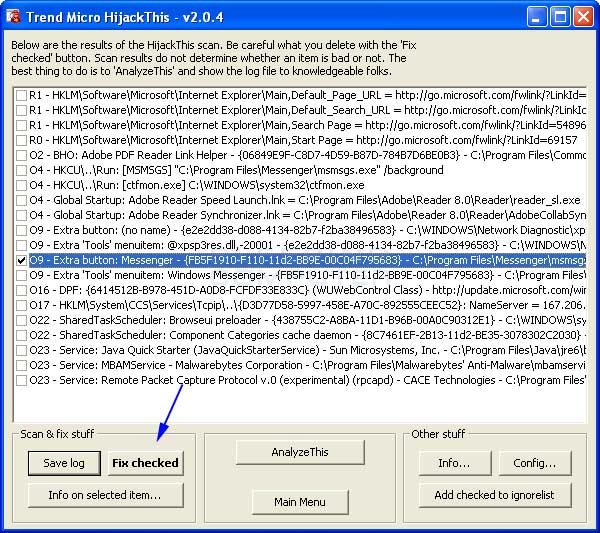
Just use the tick boxes beside each item I highlighted in green after you have done a scan.
Click on fix checked and it will back it up then delete it all. It will ask you afterwards to restart, so just select yes, restart, job done.
Compaq A910em: T2330 dual core 1.6Ghz, X3100 384MB GPU, 160GB sata HDD, 2GB RAM
Gaming rig: Asus Striker II, Coolermaster GX 750w, E4600 @ 2.4Ghz, 2.5GB RAM, Zerotherm FZ 120, 9500GT 1GB
Server: Mac mini running W23k Server - 1.8Ghz dual-core, 1GB RAM, 1x80GB, 2x500GB externals + LTO1 tape backup
An important petition, regarding your human rights:
https://www.change.org/en-GB/petitio...r-both-genders
-
Catfish
To wh666
yeah, lol, I found it before I saw your pic, but thanks, I love the way you can demonstrate where things are on any application. Back soon with a report on how my performance is doing and I will check out IE and see how it is performing now
-
Catfish
IE still giving me problems
I can't even send an image here so go here:
http://i1023.photobucket.com/albums/.../IECapture.jpg
Also, I'm having problems with sending this post, this is my 3rd attempt. Says, "website is busy" or something like that.
I just want a good backup browser. Things seem to be launching faster, but still getting some error messages. Thank you.
-
I don't roll on Shabbos!

Originally Posted by linsjean
Tinman, Thanks for your response. A friend of mine says Iron is yet another Google product and it does have tracking elements. How do you know that Iron does not have that? I am bothered because I do not understand why IE will not uninstall. l Why can't I just remove it manually? Is there a way to do that?
It says right on Iron's homepage that it doesn't support the privacy tracking elements of chrome...
http://www.srware.net/en/software_srware_iron.php
Google's Web browser Chrome thrilled with an extremely fast site rendering, a sleek design and innovative features. But it also gets critic from data protection specialists , for reasons such as creating a unique user ID or the submission of entries to Google to generate suggestions. SRWare Iron is a real alternative. The browser is based on the Chromium-source and offers the same features as Chrome - but without the critical points that the privacy concern.
We could therefore create a browser with which you can now use the innovative features without worrying about your privacy.
PC: Corsair 550D
4280k | Asus Rampage Gene | Mushkin 4x4GB | EVGA 780
Intel 120GB SSD + 2TB Seagate | Seasonic 660 Plat
2x Alphacool XT45 | Laing DDC | Bitspower
Currently playing: Civ 5
Last Game Beaten: Walking Dead
-
Catfish
Update
Ok now.....so whatever I did with removing all those things in HijackThis, I restarted and I was able then to uninstall both IE 8 and 9. Yay! But there are some components still left on my system, like logs and such and some of them won't delete because it says I need permission.
This is out of order and I want to get all of this down in writing before I forget. I remember restarting, and Skype updated itself, and it asked me if I wanted Chrome to be my default Browser. What? So, I did a search and sure enough I had some old components of Chrome on my disk. So I deleted as many as I could, except the ones that said it needs permission. Sometimes, if I do another re-start, it will allow me to delete. But why did it ask me about Chrome when Skype updated? Are they made by the same manufacturer? Of course I said no to default Chrome as my browser.
So, now, after I get all the components off of my computer with regard to IE and Chrome, I want to try to install a fresh copy of IE 9, just as a backup browser, because it seems the jury is still out about Chrome and that other one related to Chrome (can't see the post right now).
Performance is still a bit slow in launching apps.
So far, I'm not getting from FF (not responding), but haven't been on very long here and do not have any other apps open.
Also, certain apps, like Skype are acting like it's brand new to me, welcoming me to Skype and asking me to choose my preferences, etc. ??
What would you say is the next step as far as which browser to install because I'm afraid to have only 1 browser on my laptop here.
And second, would else can I do to increase speed of performance?
Thanks all!
-
Mako Shark

All this brings me back to the windows98 and xp days. Closing programs to increase performance.
Never found a need to do any of this using windows 7.
GA-MA790GPT-UD3H, AMD Phenom ll 955,
Lian Li PC-60 PLUS, HD5850
----------------
Resist the devil, and he will flee from you!
"Congress shall make no law respecting an establishment of religion."
When thou seest an eagle, thou seest a portion of genius; lift up thy head!
2kr1b1r/Bpp3pp/1N2p1n1/4p1q1/4P3/2Q5/PPP2PPP/3R1RK1 b - - 6 15
-
Catfish
 Uninstalled, then re-installed IE Uninstalled, then re-installed IE
wh666 and others,
I successfully uninstalled IE 8 and 9 from my laptop. Then I went to www.beautfyoftheweb.com and downloaded the installer for IE 9. I then installed it, it told me some files were in use and I had to restart. It went through all 3 phases and completed that process and said that IE was successfully installed. I then thought it was strange that I did not see a short cut, so I did a search for Internet Explorer using the search box in my Start button. Not there. I then went to Programs & Features and it's not there. I then proceeded to install again and it's telling me that I have a more recent version of IE on my computer.
Can someone please tell me how I can drop an image into the body of a post here?
Ok, go here please:
http://i1023.photobucket.com/albums/...rormessage.jpg
I'm starting to really hate IE. The only reason I want a second browser is for the obvious reason in case FF somehow crashes and I can't get it up and running and I need to do an emergercy email or research something.
What's next? Try to uninstall? How fun!
-
LOLWUT
Are you trying to install IE9 on Windows 2000 or something?
-
Catfish
Originally Posted by ImaNihilist
Are you trying to install IE9 on Windows 2000 or something?
Hmm, are you not seeing my sig? I have Vista.
-
Catfish
Having worse issues!
I have one Browser and that's FF. Since I have done that Hijack This removal thing, FF is giving me "not responding" more and more and Ad-Ware gave me a script error and said program will now shut down, so are other apps. I'm afraid soon I won't be able to use my computer.
Please help. What should I do next. Please read up for what has been done so far.
-
Mako Shark
Restore to when you started, try again.
GA-MA790GPT-UD3H, AMD Phenom ll 955,
Lian Li PC-60 PLUS, HD5850
----------------
Resist the devil, and he will flee from you!
"Congress shall make no law respecting an establishment of religion."
When thou seest an eagle, thou seest a portion of genius; lift up thy head!
2kr1b1r/Bpp3pp/1N2p1n1/4p1q1/4P3/2Q5/PPP2PPP/3R1RK1 b - - 6 15
-
Catfish
Originally Posted by Learux
Restore to when you started, try again.
System Restore is turned off. I remember someone told me it hogs too much memory. So now what? If I turn it back on, will it remember to go back say 3 days ago?
 Posting Permissions
- You may not post new threads
- You may not post replies
- You may not post attachments
- You may not edit your posts
-
Forum Rules
|
|


 Reply With Quote

